

Download 2 Pic – Free Windows Design & Photography Tool, Secure & Easy
Overview
2 Pic is a lightweight, free design and photography program built especially for Windows users who need a fast‑acting graphics editor without the overhead of a full‑blown suite. Created by Peter Moon, the application belongs to the Design & Photography software category and sits comfortably in the sub‑category of Graphics Editors. Since its first appearance in our catalog back in 2012, 2 Pic has accumulated more than 1,700 downloads, with a steady trickle of new users each week—particularly from the Netherlands, Belgium, and Poland.
The current stable version, 1.20, was last updated on June 19 2012, but the program still runs smoothly on Windows 98 and later, and it offers language support for English and Dutch. What makes 2 Pic stand out is its tiny installation footprint: it consumes far less disk space than the average graphics editor, which is a blessing for users with older hardware or limited SSD capacity. The interface is uncluttered, making it easy for beginners to start editing photos, creating simple graphics, or performing quick retouches.
Because it’s free, there are no hidden subscription fees or trial periods—what you download is what you keep. Security‑focused users will also appreciate that the installer is signed and distributed from reputable sources, reducing the risk of unwanted bundled software. Whether you are a hobbyist photographer looking for a quick way to touch up images, a student needing a basic editor for class projects, or a small‑business owner who wants a no‑cost solution for creating flyers, 2 Pic delivers a reliable, no‑frills experience that respects both your time and your hard‑drive space.
Key Features
- Lightweight installer – under 10 MB, perfect for low‑spec PCs.
- Supports common raster formats: JPEG, PNG, BMP, GIF, and TIFF.
- Basic photo correction tools – brightness, contrast, saturation, and hue.
- Simple drawing utilities – brushes, shapes, text overlay, and color picker.
- Layer‑like functionality for stacking edits without flattening.
- Batch processing for resizing or renaming multiple files at once.
- Multi‑language interface – English and Dutch built‑in.
- Fully portable version – run from a USB stick without installation.
- Undo/redo stack up to 20 steps, ensuring safe experimentation.
- Export options with adjustable quality settings for web or print.
While 2 Pic does not aim to replace professional suites like Adobe Photoshop or CorelDRAW, its feature set covers the essential needs of everyday image work. The batch processor, for instance, can save hours when preparing a photo gallery for a website, while the simple drawing tools let you add watermarks, captions, or basic vector shapes without learning a complex interface. Because the program runs on Windows 98 and newer, you can even install it on legacy machines that cannot handle modern 64‑bit applications. The portable mode is especially handy for photographers who travel with a single USB drive and need a quick editing solution on any Windows computer they encounter. Overall, the feature list is thoughtfully curated to keep the software intuitive while still offering enough flexibility for creative experimentation.
Installation, Usage & Compatibility
Installing 2 Pic is a straightforward process that can be completed in just a few minutes. Follow these steps to get the program up and running:
- Download the installer from the official 2 Pic download page – the file is typically named
2pic_setup.exe. - Locate the downloaded file in your
Downloadsfolder and double‑click it. - When prompted by Windows User Account Control, click Yes to allow the installer to make changes.
- The setup wizard will ask you to choose an installation folder; the default (
C:\Program Files\2Pic) works for most users. - Click Install and wait for the progress bar to finish – the entire process usually takes less than 30 seconds.
- Once installation is complete, you can launch 2 Pic from the Start menu or by double‑clicking the desktop shortcut.
Operating System Compatibility – 2 Pic is designed for Windows 98, Windows ME, Windows 2000, Windows XP, and all later versions up to Windows 10. The itemprop="operatingSystem" attribute is set to Windows, indicating broad compatibility across both 32‑bit and 64‑bit environments. Because the program is written with legacy support in mind, it runs smoothly on older hardware without requiring the latest DirectX or .NET frameworks.
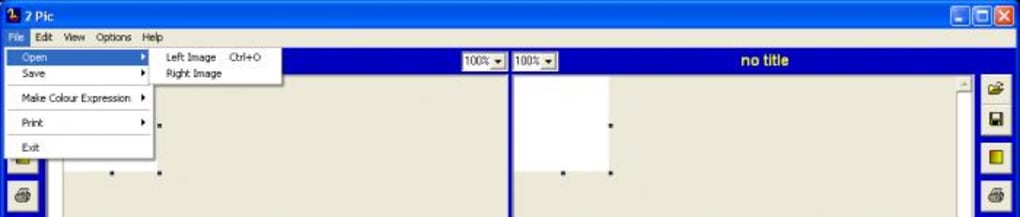
First‑time usage tips: Upon opening the application, you’ll be greeted by a clean toolbar at the top and a canvas area in the center. To open an image, click the File → Open menu or drag a picture directly onto the canvas. The right‑hand side houses the Properties panel where you can fine‑tune brightness, contrast, and other adjustments.
For quick access, keyboard shortcuts such as Ctrl+Z (undo) and Ctrl+S (save) work as expected. If you need to process many files, navigate to Tools → Batch Processor, select the source folder, choose your output settings, and hit Start. The software will automatically apply the chosen adjustments to each image, saving you countless manual steps.
Because 2 Pic is free and does not require an internet connection after installation, you can use it offline on any Windows machine, making it an excellent choice for field work, classrooms, or remote locations where bandwidth is limited. Updates are infrequent, but when they do appear, the installer will prompt you to replace the existing version without affecting your saved projects.
Pros, Cons, FAQ & Final Verdict
Pros
- Very small download size and minimal disk footprint.
- Free with no hidden fees or trial limitations.
- Runs on legacy Windows versions, ensuring broad compatibility.
- Simple, intuitive interface suitable for beginners.
- Portable mode allows usage from a USB stick.
- Basic batch processing saves time on repetitive tasks.
Cons
- Lacks advanced features such as layer masks, CMYK support, or vector editing.
- No native support for macOS, Linux, Android, or iOS.
- Last major update was in 2012, so some modern file formats may not be supported.
- Limited language options – only English and Dutch.
- No built‑in cloud storage or online collaboration tools.
Frequently Asked Questions
Is 2 Pic really free, or are there hidden costs?
Yes, 2 Pic is completely free. There are no subscription fees, trial periods, or hidden in‑app purchases. You download the installer once and can use the software indefinitely.
Can I use 2 Pic on Windows 10 64‑bit?
Absolutely. 2 Pic is compatible with all modern Windows versions, including Windows 10 64‑bit. The program runs in 32‑bit mode but works flawlessly on 64‑bit systems.
Does 2 Pic support RAW image files from DSLR cameras?
No, 2 Pic does not natively support RAW formats. You will need to convert RAW files to JPEG or PNG using another tool before opening them in 2 Pic.
Is there a portable version that doesn’t require installation?
Yes, a portable zip version is available. Simply extract the archive to a USB drive and run 2pic.exe directly—no admin rights needed.
How often is 2 Pic updated?
The last major update was released on June 19 2012 (version 1.20). Minor bug‑fix patches may appear occasionally, but the core feature set remains stable.
Conclusion & Call‑to‑Action
If you are searching for a no‑cost, lightweight graphics editor that works on older Windows machines, 2 Pic delivers exactly what you need. Its modest feature set focuses on the essentials—basic photo adjustments, simple drawing tools, and batch processing—while keeping the program fast and easy to learn. Although it lacks the power of premium suites and does not support macOS or mobile platforms, the trade‑off is a tool that runs on virtually any Windows PC without consuming precious resources. For students, hobbyists, and small businesses that require occasional image tweaking, 2 Pic is a solid, secure choice. Download it today, give it a spin, and experience how a streamlined editor can simplify your everyday design tasks.
Click here to download 2 Pic for free and start editing instantly—no registration, no fees, just a straightforward graphics editor that respects your time and storage.







